

Our Verdict
LCD and OLED each have genuine strengths. LCD remains a reliable, cost-effective choice for bright rooms and long daily use. OLED excels at contrast, color accuracy, and viewing angles, making it compelling for home theater setups and premium phones. Neither is universally superior — context is everything.
| Best for | Recommended |
|---|---|
| Bright living rooms or offices with lots of ambient light | LCD |
| Home theater setups where contrast and black levels matter most | OLED |
| Budget-conscious buyers replacing a TV or monitor | LCD |
| Smartphone users who prioritize vivid color and viewing angles | OLED |
How Each Technology Actually Works
Understanding display differences starts with one core question: where does the light come from?
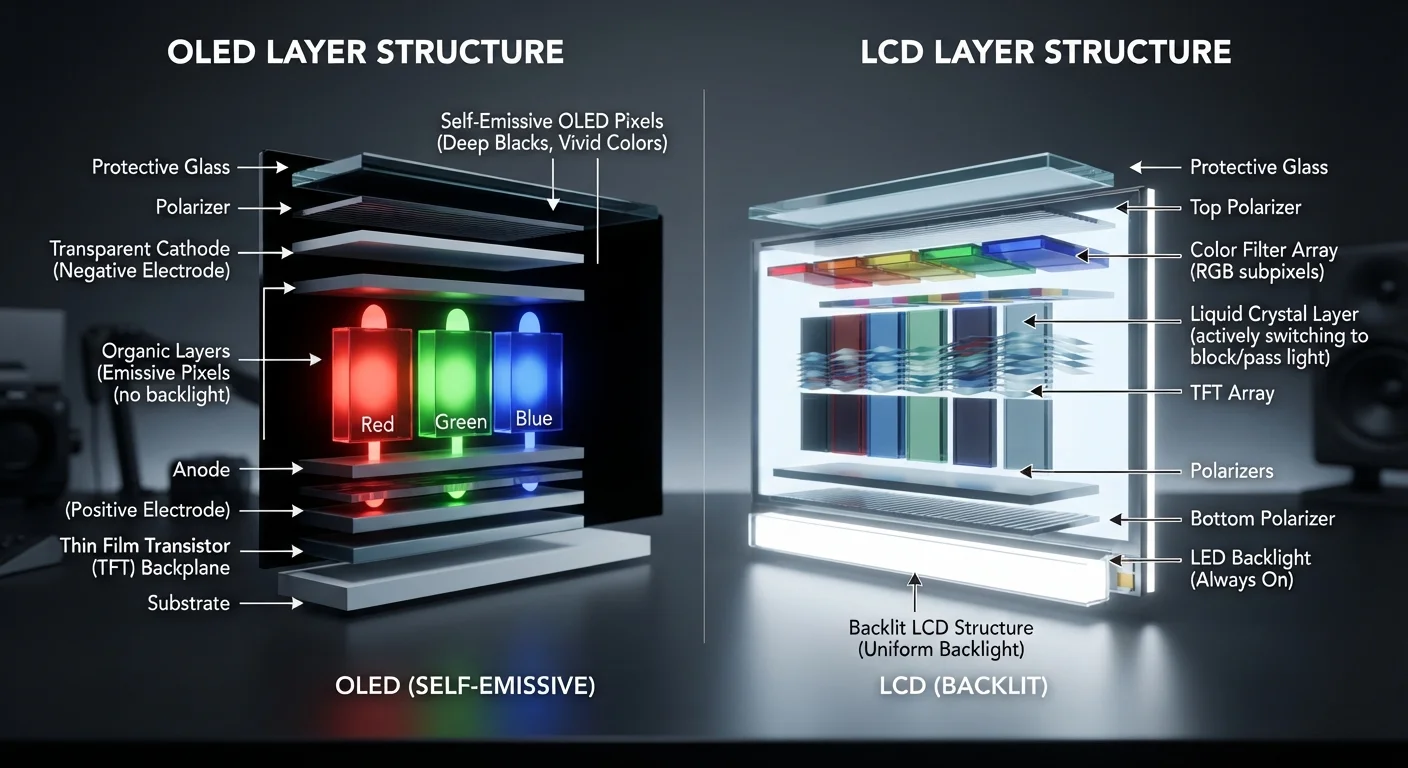
LCD (Liquid Crystal Display) relies on a separate light source — a backlight — positioned behind a layer of liquid crystals. Those crystals don't produce light themselves; they act like tiny shutters, twisting to block or allow light through. Color filters in front of them create the red, green, and blue subpixels your eye mixes into a full image. The backlight stays on constantly, even when the screen shows pure black.
OLED (Organic Light-Emitting Diode) works completely differently. Each pixel is its own microscopic light source made from organic compounds that emit light when electricity passes through them. There is no backlight. When an OLED pixel needs to display black, it simply turns off entirely.
That single distinction — individual pixel-level light control versus a shared backlight — drives nearly every meaningful difference in picture quality between the two technologies. For a broader look at how display specs fit into the bigger picture on phones, see our smartphone screen terminology guide.
| LCD | OLED | |
|---|---|---|
| Light source | Shared backlight behind panel | Each pixel emits its own light |
| Black level quality | Limited — backlight bleeds through | Excellent — pixels turn fully off |
| Peak brightness | Very high, sustained full-screen | High in highlights; lower full-screen |
| Viewing angles | Color shifts off-center | Consistent across wide angles |
| Burn-in risk | None | Low with normal use; higher with static images |
| Typical cost | Lower — widely available | Higher — reflects manufacturing cost |
| Best environment | Bright rooms, offices | Dark rooms, home theater |
What That Means for Real-World Picture Quality
Contrast and black levels are where OLED has its most decisive advantage. Because OLED pixels turn off to produce black, the contrast ratio — the difference between the brightest white and darkest black — is theoretically infinite. On an LCD, the backlight bleeds through even when liquid crystals are fully closed, creating a subtle glow in dark scenes. This is called backlight bleed or clouding, and it's most noticeable when watching movies in a dark room.
Brightness is where LCD pushes back. A well-engineered LCD panel can sustain very high peak brightness across the whole screen, which makes it easier to see in a brightly lit room. OLED panels can hit impressive peak brightness in small highlight areas, but their full-screen brightness is typically lower — meaning glare from a sunny window can wash out the image more easily.
Viewing angles favor OLED. LCD panels often shift color and lose contrast when you move off-center. OLED panels maintain consistency much further off axis, which matters when multiple people watch a TV from different seats.
Test in Conditions That Match Your Home
Showroom floors are typically very bright, which can make LCD screens look more vivid than they will in a dim living room — and can undersell an OLED panel's contrast advantage. If possible, view screens in lighting conditions similar to where you plan to use them. Asking a retailer to dim the display floor lights briefly can reveal a lot about how each panel handles dark content.
If you're thinking about how your TV fits into a larger connected setup, our guide to smart TVs and streaming devices explains how the hardware around the screen matters too.
The Trade-offs: Cost, Lifespan, and Burn-In
No technology is without downsides.
Cost: OLED panels are more expensive to produce, which is reflected in retail prices. LCD remains the dominant technology in budget and mid-range TVs, monitors, and laptops for this reason.
Burn-in: Because OLED pixels degrade slightly each time they light up, static on-screen elements — a channel logo, a video game HUD, a news ticker — can permanently imprint a faint ghost image over time. This is called burn-in. Manufacturers have introduced software mitigations (pixel shifting, screen savers, automatic brightness management), and for typical mixed-use viewing the risk is low. But viewers who leave static content on screen for many hours daily should factor this in.
Lifespan: LCD panels don't face burn-in in the same way. The backlight does dim over years, but overall longevity for everyday use is well established. OLED lifespan has improved considerably in recent generations, and for most households it's a non-issue — but it remains a legitimate consideration for commercial or display applications.
Static Images and OLED: A Real Consideration
If you plan to use an OLED display as a PC monitor or leave cable news running for hours daily, burn-in is worth taking seriously. Enable any built-in screen savers or pixel-refresh tools the display offers, and consider varying content regularly. For typical home movie and TV viewing, the risk is much lower than early OLED generations suggested.
For a deeper dive into how these specs interact with the rest of your device, our piece on what smartphone specs actually mean puts display technology in its broader context.
Choosing Based on How You Actually Use Your Screen
The right display technology isn't about which is objectively better — it's about which fits your environment and habits.
- Watch movies in a dark room? OLED's contrast and deep blacks will noticeably enhance the experience.
- Use a monitor in a bright office? A high-brightness LCD is likely to be more practical and easier on the budget.
- Game for long hours with static HUD elements? Burn-in risk is worth understanding, even if modern OLED TVs handle it better than earlier generations did.
- Replacing a bedroom or kitchen TV? A quality LCD panel offers solid performance at a lower price point.
Display specs — including panel type — are just one part of evaluating any screen. Our home tech basics hub covers more foundational guides for setting up screens and connected devices in your home.
The content on this site is for informational purposes only and is not a substitute for professional advice. Always consult a qualified professional for guidance specific to your situation.